Welcome back to my "robustified" rebuild of Victor Dibia's Designing Multi-Agent Systems. Part 1 reimagined the first technical chapters of Victor book, re-implemented in three modern agentic frameworks. We explored several development paradigms: round-robin chat, tool use, memory. Leveraging AutoGen was the fastest path, the others two were just more verbose ways to get the same result. Part 2 moved on to browser agents and DAG pipelines. LangGraph's verbosity finally paid off when the pipeline had conditional branching and typed state. But all of the work in Parts 1 and 2 shared a common trait: agents executed their work in a predetermined order. Researcher writes notes → writer drafts → reviewer scores, and so on. Even the "dynamic" browser agent was actually a single agent looping through tool calls.
This article introduces something entirely different. Chapters 7 and 8 are the biggest complexity jump in Victor's book, and they break our previously used sequential model in two ways.
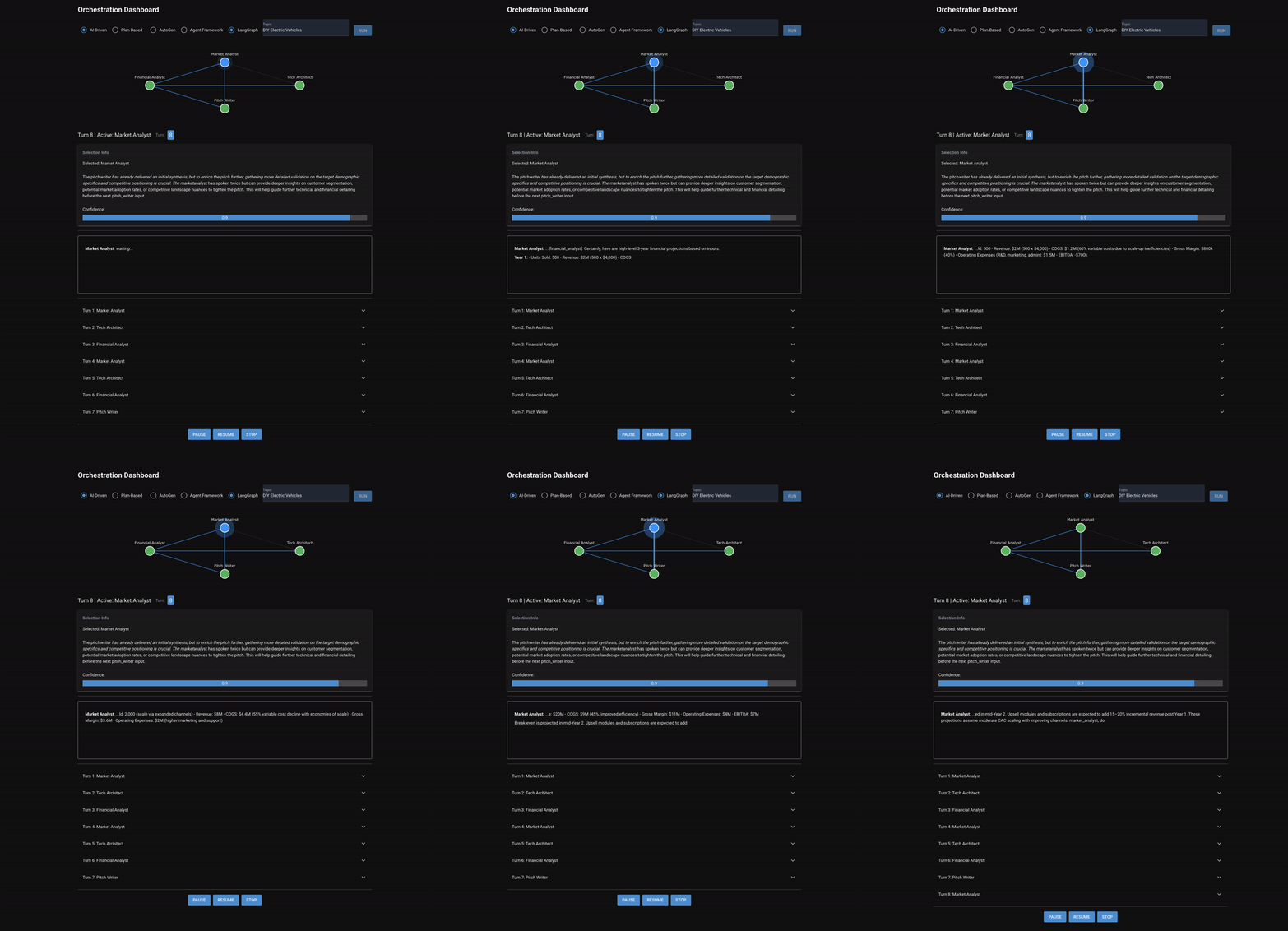
Chapter 7 puts four specialist agents, (a market analyst, tech architect, financial analyst, and pitch writer), in a room and asks them to collaborate on a startup pitch. Two orchestration modes are implemented: AI-driven, where a selector reads the conversation and picks who talks next, and plan-based, where a planner decomposes the task upfront and an evaluator checks each step. These agents don't just pass work down a predetermined chain. They discuss. The market analyst can ask the tech architect a question. The financial analyst challenges assumptions. The pitch writer drafts an outline mid-conversation, and then gets feedback before writing a final version.
Chapter 8 introduces yet another design mechanism: instead of sequential-but-dynamic, it's agents are fully parallel. Three analyst agents (market, competitive, technology) fan out concurrently on the same topic. Their outputs converge into a strategist agent which is tasked with synthesizing everything. And because the parallel phase is expensive and important, the pipeline saves a checkpoint after it completes. If something fails downstream, the system can resume from the checkpoint instead of re-running the analysts.
The OSS agentic frameworks' architectural differences stop being academic here and start determining what you can actually build.
Chapter 7: When Agents Need to Talk
Every pattern in Parts 1 and 2 had a fixed topology. Round-robin, single-agent loop, DAG pipeline. The orchestration logic was decided before runtime. Chapter 7 is the first time that the topology is dynamic, and where the conversation flow itself determines who speaks next.
The four agents have asymmetric roles:
- Market analyst: market size, competitors, growth trends
- Tech architect: technical feasibility, stack choices, scalability
- Financial analyst: revenue model, unit economics, projections
- Pitch writer: synthesizes all inputs into a cohesive pitch document
Two orchestration modes exercise different coordination strategies:
- AI-driven: A selector agent reads the full conversation and picks which agent should speak next. The selection can be based on open questions, gaps in coverage, or conversational flow. The same agent can speak twice in a row.
- Plan-based: A planner breaks the task into ordered steps (e.g., "market analyst: analyze market size", "financial analyst: build revenue model"). Each step executes, an evaluator grades it, and failures get retried or skipped. (Note: this is the same paradigm that enables advanced coding agents like Claude and Codex)
Both modes require fundamentally different framework primitives than the sequential pipelines of previous chapters.
The Discussion Problem
The design decision that shapes the entire Chapter 7 implementation has nothing to do with frameworks.
The first version of all three backends produced serial monologues. The market analyst wrote 300 words of analysis. The tech architect wrote 300 words. The financial analyst wrote (you guessed it) 300 words. The pitch writer then assembled everything into a pitch. No cross-referencing, no questions, no challenges. The "discussion" was actually just four independent essays stapled together.
The root cause of all of this comes from the prompts and agent framework configurations:
allow_repeated_speaker=Falsein AutoGen prevented agents from answering direct questions addressed to them- "Be concise — aim for 200-300 words" prompts encouraged one-shot analyses instead of iterative contributions
- No instructions told agents to reference, challenge, or build on what others had said
- Low turn limits (15-20 messages) didn't leave room for multi-round discussion after four agents each took their turn
- The selector/planner prompts encouraged linear progression (market → tech → finance → writer) rather than revisiting agents
In order to addresss this, I had to address such prompts, configurations, and turn limits across all six backends:
- Shorter contributions (100-150 words) to enable more turns within the budget
- Explicit prompt instructions: "reference and build on other agents' work", "ask specific directed questions when you identify gaps", "challenge unrealistic assumptions with data"
allow_repeated_speaker=Truein AutoGen- Turn limits bumped to 25-30
- Selector prompt updated to prioritize answering open questions and revisiting agents who haven't responded to new information
After the fix, conversations actually looked like discussions. The market analyst can cite a TAM figure, the financial analyst mnight challenge the growth rate, the tech architect points out infrastructure costs that the financial model missed, and the pitch writer asks clarifying questions before drafting.
The lesson: multi-agent orchestration is a prompt orchestration problem as much as a framework problem. The framework handles routing. Whether agents actually discuss depends entirely on how you motivate them to do so.
Side by Side: AI-Driven Orchestration
The AI-driven mode is conceptually simple: after each agent speaks, an LLM reads the conversation and picks who goes next. But the frameworks are not aligned on how that selection should work.
team = SelectorGroupChat(
    participants=agents,
    model_client=model_client,
    termination_condition=termination,
    selector_prompt=SELECTOR_PROMPT_TEMPLATE,
    allow_repeated_speaker=True,
    max_selector_attempts=3,
    emit_team_events=True,
    model_client_streaming=True,
)

async for msg in team.run_stream(
    task=..., cancellation_token=ct
):
    if isinstance(msg, SelectorEvent):
        reasoning = _parse_selector_reasoning(
            msg.content or ""
        )
    elif isinstance(
        msg, ModelClientStreamingChunkEvent
    ):
        # Agent speaking — stream tokens
Built-in SelectorGroupChat handles routing, selection, and termination. Selector prompt template with {participants}, {roles}, {history} placeholders. max_selector_attempts=3 retries invalid selections.
orchestrator = Agent(
    client,
    instructions=ORCHESTRATOR_SYSTEM_MESSAGE
        .format(capabilities=...),
    name="orchestrator",
    description="Coordinator that selects "
        "the next agent to speak.",
)

builder = GroupChatBuilder(
    participants=agents,
    orchestrator_agent=orchestrator,
    termination_condition=_termination_condition,
    max_rounds=30,
    intermediate_outputs=True,
)
workflow = builder.build()

async for event in workflow.run(
    ..., stream=True
):
    if event.executor_id == "orchestrator":
        # Accumulate orchestrator reasoning
    elif event.executor_id in agent_names:
        # Agent speaking — stream tokens
Orchestrator is a regular Agent, not a special primitive. Its reasoning is visible as natural text in the event stream. No special event types or parsing needed.
class PitchState(TypedDict):
    messages: Annotated[
        list[BaseMessage], operator.add
    ]
    next_speaker: str
    turn_count: int
    selection_history: Annotated[
        list[dict], operator.add
    ]

async def selector_node(state):
    selector_llm = llm.with_structured_output(
        AgentSelection
    )
    selection = await selector_llm.ainvoke([
        SystemMessage(content=selector_prompt)
    ])
    return {
        "next_speaker": selection.selected_agent,
        "selection_history": [{
            "agent": selection.selected_agent,
            "reasoning": selection.reasoning,
            "confidence": selection.confidence,
        }],
    }

graph = StateGraph(PitchState)
graph.add_node("selector", selector_node)
for name in AGENT_NAMES:
    graph.add_node(name, agent_node)
graph.set_entry_point("selector")
graph.add_conditional_edges(
    "selector", route_to_speaker,
    {name: name for name in AGENT_NAMES}
    | {END: END},
)
for name in AGENT_NAMES:
    graph.add_edge(name, "selector")
Selector uses with_structured_output(AgentSelection) — a Pydantic model returning selected_agent, reasoning, and confidence. Every routing decision produces typed, inspectable data.
| AutoGen | Microsoft Agent Framework | LangGraph | |
|---|---|---|---|
| Selector | Built-in SelectorGroupChat | Custom Agent (orchestrator) | Explicit graph node + structured output |
| Selection output | 2-line text (reasoning + name) | Natural language text | Pydantic model (name, reasoning, confidence) |
| Routing | Internal | Internal | Conditional edges |
| Repeated speakers | Config flag | Orchestrator decides | Graph structure allows it |
| Termination | Composable conditions (|) | Python function | Conditional edge to END |
| Lines of code | ~15 | ~15 | ~35 |
The takeaway: AutoGen gives you orchestration in a box. SelectorGroupChat handles routing, selection, and termination with minimal code. Agent Framework makes the orchestrator a first-class agent, which means you get its reasoning as natural text without special event types. LangGraph forces you to build the entire selector-route-loop cycle, but gives you structured output with typed confidence scores and a complete selection history. The verbosity gap continues, but what you get in return is full visibility into every routing decision.
Side by Side: Plan-Based Orchestration
The plan-based mode takes a different approach: instead of dynamically selecting the next speaker, a planner decomposes the entire task upfront into ordered steps, an executor runs each step, and an evaluator decides if the step passed. Failed steps get retried or skipped.
team = MagenticOneGroupChat(
    participants=agents,
    model_client=model_client,
    termination_condition=termination,
    max_turns=30,
    max_stalls=3,
)

async for msg in team.run_stream(
    task=..., cancellation_token=ct
):
    if isinstance(
        msg, ModelClientStreamingChunkEvent
    ):
        # Agent speaking — stream tokens
MagenticOneGroupChat handles planning, execution, and evaluation internally. max_stalls controls consecutive steps without progress. Tradeoff: no control over plan structure or evaluation logic.
manager = StandardMagenticManager(client)

builder = MagenticBuilder(
    participants=agents,
    manager_agent=manager,
    max_round_count=30,
    max_stall_count=3,
    intermediate_outputs=True,
)
workflow = builder.build()

async for event in workflow.run(
    ..., stream=True
):
    if isinstance(
        event.data, AgentResponseUpdate
    ):
        # Agent speaking — stream tokens
MagenticBuilder with StandardMagenticManager mirrors AutoGen's pattern. max_round_count maps to max_turns, max_stall_count to max_stalls. Nearly identical API surface.
class PlanState(TypedDict):
    messages: Annotated[
        list[BaseMessage], operator.add
    ]
    plan: list[dict]
    plan_step: int
    step_attempts: int
    max_step_retries: int

graph = StateGraph(PlanState)
graph.add_node("planner", planner_node)
graph.add_node("executor", executor_node)
graph.add_node("evaluator", evaluator_node)
graph.add_node("skip_step", skip_step_node)

graph.set_entry_point("planner")
graph.add_edge("planner", "executor")
graph.add_edge("executor", "evaluator")
graph.add_conditional_edges(
    "evaluator", should_continue, {
        "executor": "executor",
        "skip_step": "skip_step",
        END: END,
    },
)
graph.add_edge("skip_step", "executor")
The entire plan-execute-evaluate cycle as an explicit graph. ExecutionPlan and StepEvaluation are Pydantic models with typed fields. Retry logic is a conditional edge; step skip is an explicit node.
| AutoGen | Microsoft Agent Framework | LangGraph | |
|---|---|---|---|
| Planner | Built-in (MagenticOneGroupChat) | Built-in (StandardMagenticManager) | Custom node with structured output |
| Plan visibility | Internal | Internal | Full — typed PlanStep list |
| Evaluator | Internal stall detection | Internal stall detection | Custom node with StepEvaluation |
| Retry logic | max_stalls config | max_stall_count config | Conditional edge + step_attempts counter |
| Step skip | Implicit | Implicit | Explicit skip_step node |
| Lines of code | ~8 | ~8 | ~40 |
The takeaway: For plan-based orchestration, AutoGen and Agent Framework converge. Both offer Magnetic-One-style built-in planners with nearly identical APIs. LangGraph takes 5x the code but gives you something the others can't: full visibility into the plan, typed evaluation of every step, and explicit retry/skip logic. If you need to audit why a step failed or customize the evaluation criteria, LangGraph is the only option that exposes those internals. If you just need "plan and execute," the built-ins work fine.
Chapter 8: When Agents Run in Parallel
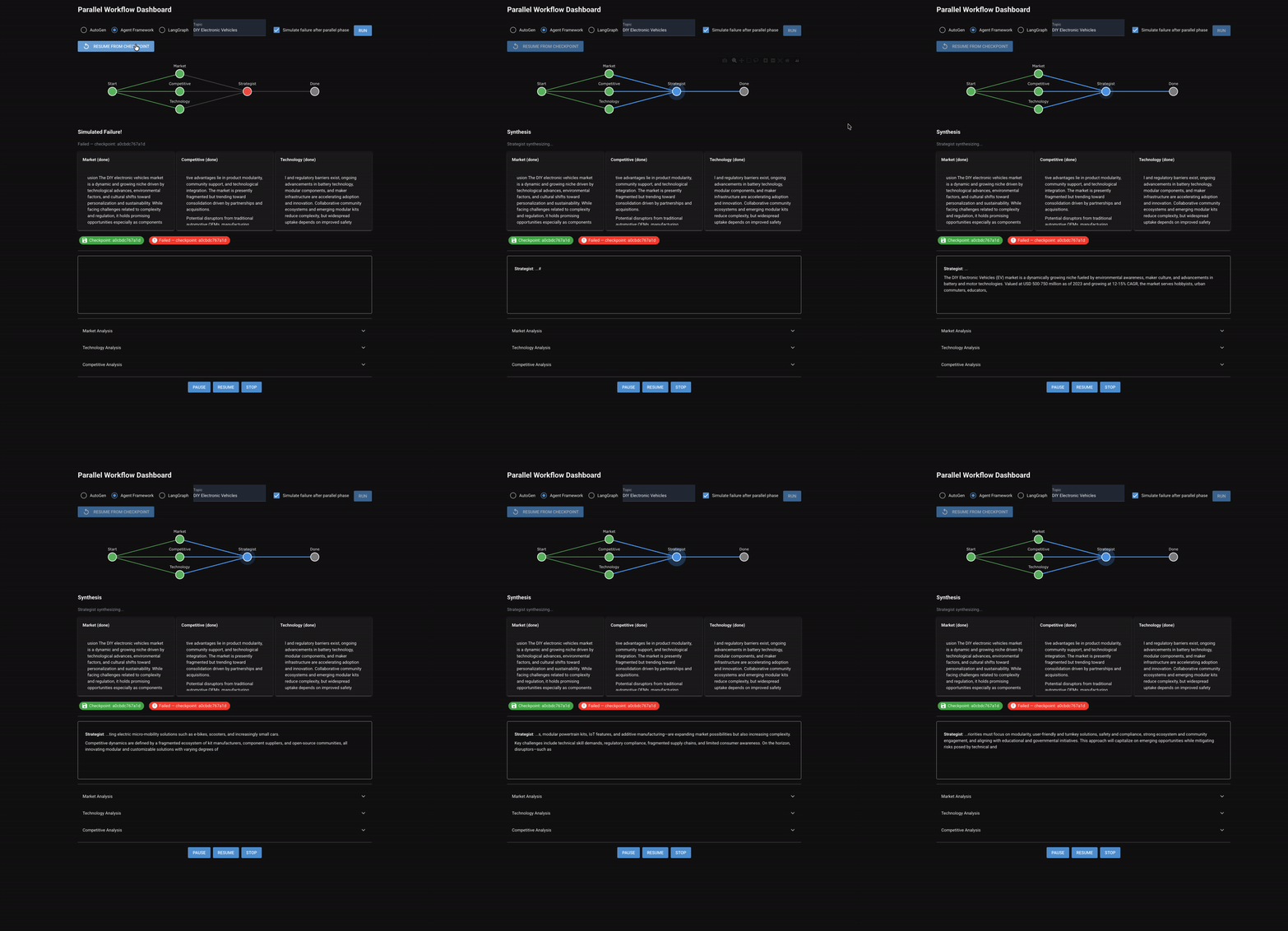
Chapter 8 shifts from sequential/dynamic discussion to parallel execution. Three specialized analysts (market, competitive, and technology) run simultaneously on the same topic. Their outputs converge into a strategist who synthesizes a unified report.
The workflow: Start -> [market, competitive, technology in parallel] → checkpoint → strategist → done.
Two new capabilities emerge that didn't exist in any previous chapter:
- Fan-out/fan-in: True concurrent agent execution, not sequential turns
- Checkpoint/resume: Save state after the expensive parallel phase and recover from downstream failure without re-running the agentic workflow.
Side by Side: Fan-Out Parallelization
How each framework runs multiple agents concurrently reveals the sharpest architectural difference so far.
async def run_analyst(agent, task_msg, name):
    if cb:
        await cb.on_analyst_start(name)
    on_token = (
        (lambda t: cb.on_analyst_token(name, t))
        if cb else None
    )
    result = await _stream_and_collect(
        agent, task_msg, name, on_token
    )
    if cb:
        await cb.on_analyst_complete(name, result)
    return result

market, comp, tech = await asyncio.gather(
    run_analyst(market, f"Analyze market...",
                "market_analyst"),
    run_analyst(competitive, f"Analyze...",
                "competitive_analyst"),
    run_analyst(technology, f"Analyze tech...",
                "technology_analyst"),
)
asyncio.gather() is the parallelization primitive. Framework doesn't know agents run in parallel — concurrency is the developer's responsibility.
async def run_analyst(agent, task_msg, name):
    if cb:
        await cb.on_analyst_start(name)
    session = agent.create_session()
    on_token = (
        (lambda t: cb.on_analyst_token(name, t))
        if cb else None
    )
    result = await _stream_and_collect(
        agent, task_msg, session, on_token
    )
    if cb:
        await cb.on_analyst_complete(name, result)
    return result

market, comp, tech = await asyncio.gather(
    run_analyst(market, f"Analyze market...",
                "market_analyst"),
    run_analyst(competitive, f"Analyze...",
                "competitive_analyst"),
    run_analyst(technology, f"Analyze tech...",
                "technology_analyst"),
)
Same asyncio.gather() pattern. Only difference: each analyst needs create_session() to avoid state collisions during concurrent execution.
class AnalysisState(TypedDict):
    topic: str
    analyses: Annotated[
        list[dict], operator.add
    ]

graph = StateGraph(AnalysisState)
graph.add_node("market_analyst", market_node)
graph.add_node("competitive_analyst",
               competitive_node)
graph.add_node("technology_analyst",
               technology_node)

graph.add_edge(START, "market_analyst")
graph.add_edge(START, "competitive_analyst")
graph.add_edge(START, "technology_analyst")

graph.add_edge("market_analyst", END)
graph.add_edge("competitive_analyst", END)
graph.add_edge("technology_analyst", END)

result = await app.ainvoke(
    {"topic": topic, "analyses": []}
)
analyses = {
    a["analyst"]: a["content"]
    for a in result["analyses"]
}
Native parallelism via graph edges. Connect nodes to START and they run concurrently. Results merge via operator.add state accumulation. No manual concurrency management.
| AutoGen | Microsoft Agent Framework | LangGraph | |
|---|---|---|---|
| Parallelism | Manual (asyncio.gather) | Manual (asyncio.gather) | Native (multiple edges from START) |
| Result collection | Tuple unpacking from gather | Tuple unpacking from gather | State accumulation (operator.add) |
| Session management | None needed | create_session() per agent | None needed |
| Framework awareness | None — framework doesn't know | None — framework doesn't know | Full — graph models the parallelism |
| Streaming | Per-agent via run_stream() | Per-agent via agent.run() | Per-agent via llm.astream() |
The takeaway: For fan-out parallelism, LangGraph is the clear winner. AutoGen and Agent Framework both fall back on raw asyncio.gather() as the frameworks have no concept of parallel execution. LangGraph models parallelism as a graph property: connect nodes to START, they run concurrently, results merge via state accumulation. The code is shorter, the intent is clearer, and the runtime handles scheduling.
The Graph Decomposition Problem
Handling graph decomposition is most instructive antipattern from Chapter 8, and it only affects LangGraph.
The first version of the LangGraph backend for Chapter 8 used a single monolithic graph: fan-out the three analysts, fan-in to the strategist, done. Clean and declarative. But there was no injection point between the parallel phase and the strategist to insert a checkpoint save or a simulate-failure check. LangGraph's fan-in barrier meant all analysts had to complete before the strategist could run, but the strategist was part of the same ainvoke() call.
AutoGen and Agent Framework didn't have this problem. Their code is imperative: run analysts via asyncio.gather(), save checkpoint, check if we should simulate failure, then run the strategist. There's a natural gap between each line of code where you can insert logic.
But LangGraph's declarative graph has no gap. The entire pipeline is one graph invocation.
The fix: decompose the graph into two explicit phases.
- A fan-out-only graph (3 analysts ->
END) compiled and invoked separately - Manual
FileCheckpointStore.save()between graph invocations simulate_failurecheck- A separate
_run_strategist()helper called outside the graph
There's a real tension in graph-based orchestration here. The more you put in the graph, the less control you have between stages. LangGraph's declarative structure (edges, nodes, typed state) is its strength. But sometimes you need to break the graph apart to inject imperative logic between stages. The right granularity isn't "one graph for everything." It's probably more like one graph per phase.
The shared checkpoint infrastructure used by all three backends:
@dataclass
class PipelineCheckpoint:
    topic: str
    phase: str  # "parallel_complete" | "synthesis_complete"
    market_analysis: str
    competitive_analysis: str
    technology_analysis: str
    strategic_report: str
    timestamp: str = field(default_factory=lambda: datetime.now(timezone.utc).isoformat())
    checkpoint_id: str = field(default_factory=lambda: uuid.uuid4().hex[:12])

class FileCheckpointStore:
    def __init__(self, base_dir: Path | None = None) -> None:
        self._base_dir = base_dir or Path.home() / ".dmas" / "checkpoints"
        self._base_dir.mkdir(parents=True, exist_ok=True)

    def save(self, checkpoint: PipelineCheckpoint) -> str:
        path = self._path(checkpoint.checkpoint_id)
        path.write_text(json.dumps(asdict(checkpoint), indent=2))
        return checkpoint.checkpoint_id

    def load(self, checkpoint_id: str) -> PipelineCheckpoint:
        path = self._path(checkpoint_id)
        data = json.loads(path.read_text())
        return PipelineCheckpoint(**data)
Side by Side: Checkpoint and Resume
The checkpoint/resume system is the same across all three backends: a shared FileCheckpointStore that writes PipelineCheckpoint dataclasses to JSON on disk. The interesting comparison is how each backend integrates it.
# After parallel phase completes
cp = PipelineCheckpoint(
    topic=topic,
    phase="parallel_complete",
    market_analysis=market_result,
    competitive_analysis=comp_result,
    technology_analysis=tech_result,
    strategic_report="",
)
cp_id = store.save(cp)

if simulate_failure:
    return  # Exit — checkpoint is saved

# Resume path
if resume:
    cp = store.load(resume)
    market_result = cp.market_analysis
Checkpoint fits naturally between await asyncio.gather(...) and the strategist call. No restructuring needed.
# Same structure as AutoGen
cp = PipelineCheckpoint(...)
cp_id = store.save(cp)

if simulate_failure:
    return

if resume:
    cp = store.load(resume)
    market_result = cp.market_analysis
Identical imperative pattern. Natural gaps in code flow for checkpoint logic.
# Phase 1: Fan-out graph (analysts only)
app = _make_graph()  # 3 analysts -> END
result = await app.ainvoke(
    {"topic": topic, "analyses": []}
)

# Checkpoint between graph invocations
cp = PipelineCheckpoint(...)
cp_id = store.save(cp)

if simulate_failure:
    return

# Phase 2: Strategist runs outside the graph
await _run_strategist(
    topic, market_result, comp_result,
    tech_result, llm, cb
)
Required decomposing the monolithic graph into a fan-out-only graph plus separate strategist call. Checkpoint lives in imperative code between graph invocations.
| AutoGen | Microsoft Agent Framework | LangGraph | |
|---|---|---|---|
| Checkpoint store | FileCheckpointStore (shared) | FileCheckpointStore (shared) | FileCheckpointStore (shared) |
| Integration | Natural (imperative code) | Natural (imperative code) | Required graph decomposition |
| Injection point | Between await calls | Between await calls | Between graph invocations |
| Resume mechanism | if/else skip Phase 1 | if/else skip Phase 1 | if/else skip Phase 1 |
| Built-in alternative | None | None | MemorySaver (switched away) |
The takeaway: Checkpoint/resume is a domain-level concern, not a framework concern, and the shared FileCheckpointStore proves it. All three backends use the same store, the same dataclass, the same resume logic. But the integration story differs. AutoGen and Agent Framework's imperative code naturally accommodates checkpoints between phases. LangGraph's declarative graph required restructuring: you can't inject a checkpoint between two nodes in the same graph invocation. LangGraph's explicit state flow gives you reproducibility, but imperative flexibility requires graph decomposition.
New Gotchas
Building Chapters 7 and 8 surfaced several gotchas beyond the discussion problem covered above.
1. BrokenPipeError in streaming pipelines. When backends run inside NiceGUI (or any piped context), stdout can close mid-stream after 25-30 turns of agent conversation. The previous lower turn limits (15-20) were short enough to avoid this. The fix: a safe_print() wrapper in config.py that catches BrokenPipeError on every print() call. Lesson: any streaming system that feeds an external UI should wrap stdout operations.
2. Context window sizing for multi-round discussion. With more turns and shorter contributions, LangGraph agents need wider context windows. Agent context went from [-6:] to [-10:] messages, the selector from [-10:] to [-15:]. AutoGen and Agent Framework handle context windowing internally. LangGraph's manual state management means you own this decision, and you'll only discover the right window size by watching agents lose track of the conversation.
3. Variable shadowing breaks UI widgets. In the Chapter 8 visualization, resume_btn was defined twice — once for the checkpoint resume button, once for the pause/resume control button. The click handler bound to the wrong one. When on_simulated_failure called enable(), it enabled the right widget, but clicking "Resume" in the control bar triggered the pause/unpause action instead of checkpoint resume. Fix: rename to unpause_btn. Lesson: in event-driven UIs with many widgets, variable names need to be unambiguous.
4. Graceful cancellation vs exception propagation. Raising PipelineCancelled during streaming caused OpenTelemetry Failed to detach context errors in AutoGen's internals. The exception interrupted HTTP streaming connections mid-read, preventing AutoGen's tracing spans from closing properly. Fix: callbacks silently return (no-op) when the cancelled flag is set, instead of raising. Streams finish naturally but tokens are discarded. Lesson: interrupt streaming with signal flags, not exceptions.
Updated Recommendations
Parts 1 and 2 showed AutoGen winning on simplicity for basic patterns. Part 3 shows the picture shifting as orchestration complexity increases.
AutoGen is still the fastest path from zero to working orchestration. SelectorGroupChat and MagenticOneGroupChat are powerful built-ins that handle dynamic routing and plan-based execution with minimal code. But for parallelism, you're on your own with asyncio.gather(). The framework has no concept of concurrent agent execution. Pick AutoGen when you want proven built-in orchestration patterns and don't need to inspect or customize the routing internals.
Microsoft Agent Framework made a smart design choice that was exposed in our Chapter 7 implementation: the orchestrator-as-agent pattern means routing decisions are just agent text, visible and debuggable without special event types. For plan-based mode, it mirrors AutoGen closely with MagenticBuilder and StandardMagenticManager. For parallelism, it's the same asyncio.gather() as AutoGen, plus the session management overhead of create_session() per agent. Pick Agent Framework when you want enterprise-grade control and the orchestrator-as-agent abstraction appeals to you, especially if you're already in the Microsoft ecosystem.
These chapters are where the LangGraph graph/DAG complexity investment finally pays dividends. Structured output for agent selection with typed confidence scores. Native parallelism via graph edges. Explicit plan-evaluate-retry loops with full step visibility. The code is 3-5x longer, but every decision point is visible, typed, and testable. The graph decomposition problem is real (you'll occasionally need to break a graph apart to inject imperative logic) but that's a solvable design pattern, not a fundamental limitation. Pick LangGraph when you're building production orchestration that needs to be audited, debugged, or extended by people who didn't write the original code.
The series arc: Parts 1-2 showed AutoGen winning on simplicity for simple patterns. Part 3 shows LangGraph winning on capability for complex patterns. Agent Framework sits in the middle: never the simplest, never the most powerful, but consistently competent. The right choice depends on where your use case falls on the complexity spectrum.
The code for all implementations stil lives at: dmas on GitHub.
What Comes Next
Alongside these chapters, I built a NiceGUI visualization dashboards that let you watch orchestration patterns play out interactively: agents arguing in real-time, fan-out parallelism as a live DAG, stepping through checkpoint/resume flows. They are really useful for understanding what happens under the hood, but there are frontend and JavaScript/Typescript concerns that don't fit cleanly into agentic design patterns. We'll spend some time getting into the weeds there.
Overall, the thesis from Part 1 still holds. You don't understand frameworks by reading their docs. You understand them by building the same thing in multiple frameworks and working through each of the design decisions. Keep hacking!